http://www.seeedstudio.com/depot/hijack-development-pack-p-865.html?cPath=174
Hijack Development Pack

Do we have any iPhone users here? What were you thinking when Google released ADK for Android devices? You probably want to have an equal chance to play your mobile devices with open source hardware as we did. The idea of connecting iPhone with those existing open source components is great and more importantly is achievable now with our Hijack Development Pack!
Here is a clue that what the main board of Hijack looks like. It’s a little tiny thing with cubic-inch size so that you can carry it to anywhere you like. But the project itself is a fully functional hardware/software platform for creating sensor peripherals for the mobile devices. The Hijack platform enables a new class of small and cheap phone-centric sensor peripherals that support plug-and-play operation. As we said, Hijack has been tested with the iPhone 3G/3GS/4, iPod Touch, and iPad devices.
So, how does it work? Just simply plug the main board into iDevice’s headset port, and the Hijack energy harvester can harvest power from the device that means there is no extra energy source required. Beyond that, sensing and data can be translating to iDevices through the Hijack kit made by Seeedstudio. As seen in below picture, the kit has two Twig interfaces that one is for analog read and the other is for I2C. Plugging the kit into the main board, and the MCU on Hijack get the sensing data and then translate them to iDevices through the audio connector after encoding/demodulating. Of course, you will need to download a Hijack app from app store first. It is for free and here is the link.
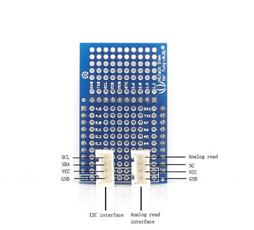
What can we do with Hijack development pack? The Hijack kit combines energy transfer, data input, and data output into a single, integrated application. It is possible for you now to change your iDevices into an instrument that can display the sensing result with the help of Hijack. We got a few quick demos here.
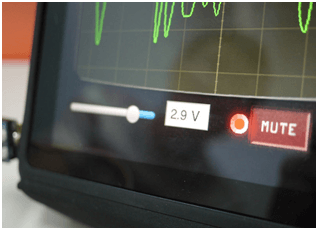
Connecting the Twig – Potentiometer with Hijack. Rotate the Potentiometer, and you will see the waveform on the iPad changes as responding. Also, the voltage result shows at the bottom of the screen.
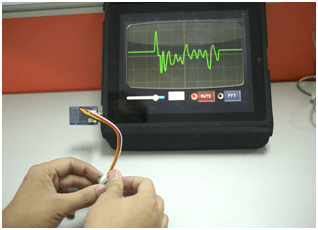
Connecting Hijack with Twig – Touch Sensor. Touch the sensor, and you will find the waveform on the iPad screen raise up to the top about 3.3v, whereas the waveform would drop to the bottom when you release your finger.
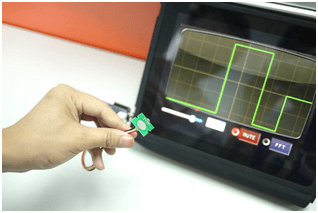
Other applications can also be achieved through using our various Twig components. It’s your time to brain storm and tell us what else we can do with Hijack and iPhone/iPads. Cheers!
Here, we want to specially thank you the designer team of Hijack project, including Ye-Sheng Kuo, Sonal Verma, Thomas Schmid, and Prabal Dutta.


沒有留言:
張貼留言